ကၽြန္ေတာ္ ဒီ တစ္ခါေတာ့ Gtalk မွာ ျမန္မာစာ မေပၚဘဲ အတံုးေလးေတြပဲ ေပၚေနလို႕ စိတ္ညစ္ေနတဲ့ သူေတြအတြက္ ကၽြန္ေတာ္က ရွင္းျပေပးပါ့မယ္ဗ်ာ။ ကၽြန္ေတာ့ IT Bank ရဲ႕ Cbox မွာလဲ minminswe57@gmail.com ကိုမင္း ကေမးထားလို႕ ကၽြန္ေတာ္ ေျဖေပးလိုက္ပါတယ္ဗ်ာ။
ကၽြန္ေတာ္ ကိုမင္း ေမးထားတဲ့ ဒီေမးခြန္းေလး က ၾကာပါျပီ။ ကၽြန္ေတာ္ အလုပ္မအားလို႕ Post ေတြထဲ မေရးျဖစ္ ေမးထားတာေတြလဲ မေျဖျဖစ္ဘဲ အခုလို ေနာက္က်မွ ေျဖေပးမိတဲ့ အတြက္ ကၽြန္ေတာ္ ေတာင္းပန္ပါရေစဗ်ာ။ အခုေတာ့ ကၽြန္ေတာ္ ကိုမင္းဆိုတဲ့ အစ္ကို ေမးထားတာေလးေကာ Gtalk မွာ ျမန္မာစာ မေပၚတာေလးေကာ ေရာျပီး ရွင္းျပေပးလိုက္ပါတယ္ေနာ္။ အရင္ဦးဆံုး ကၽြန္ေတာ္တို႕ လုပ္ရမွာက Gtalk က Setting ကို သြားလိုက္ပါ ။ေအာက္ကပံုေလး အတိုင္းေပါ့ဗ်ာ။
ေအာက္က ပံုေလး အတိုင္းျပီးသြားရင္ေတာ့ Gtalk Setting ရဲ႕ General ဆိုတဲ့ေနရာေလးကို ေရာက္သြားပါလိမ့္မယ္။အဲ့ဒီမွာ
Change Font ဆိုတဲ့ေနရာေလးကို Click လိုက္ပါ။ မလုပ္တက္ေသးရင္ ကၽြန္ေတာ္ေအာက္မွာ ပံုေလး နဲ႕ တကြရွင္းျပေပးထားပါတယ္ဗ်ာ။
အေပၚက ပံုေလး အတိုင္းေကာ စာေလးေကာ လုပ္လို႕ျပီးသြားရင္ Change Font ဆိုတဲ့ေနရာေလး ကို ႏွိပ္လိုက္ရင္ Box တစ္ခု က်လာပါလိမ့္မယ္။ အဲ့ဒီ Box ေလးမွာ Zawgyi-One ဆိုတာေလးကို ရွာျပီး Click လိုက္ပါ။ျပီးရင္ ေတာ့ Ok ေပါ့။မရွင္းေသးရင္ ေအာက္ကပံုေလး ကိုၾကည့္လိုက္ပါေနာ္။
အဲ့ဒါမွ အဆင္မေျပေသးဘူး ဆိုရင္ Internet Explorer ရဲ႕ Tools က Internet Options ကို Click လိုက္ပါ။ ေအာက္က ပံုေလး အတိုင္းေပါ့ဗ်ာ။
Click ျပီးျပီဆိုရင္ေတာ့ Internet Options က General ဆိုတ့ဲ စာမ်က္ႏွာေလး မွာ Fonts ဆိုတဲ့ ေနရာေလးကို Click လိုက္ပါ ။ေ အာက္က ပံုေလး အတိုင္းေပါ့။
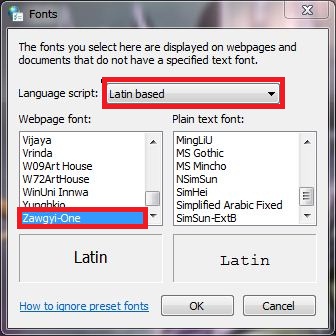
Fonts ဆိုတဲ့ ေနရာေလးကို Click ျပီးသြားရင္ ကၽြန္ေတာ္တို႕ က ေနာက္တစ္ဆင့္မွာ Language script: ဆိုတဲ့ေနရာမွာ Latin Based ကို ေရြးထားရမွာျဖစ္ပါတယ္ဗ်ာ။ျပီးရင္ ေအာက္နားေလးမွာ Webpage Font: ဆိုတဲ့ ေနရာေလးမွာေတာ့ Zawgyi-one ကို ေရးထားရမွာ ျဖစ္ပါတယ္ဗ်ာ။ကၽြန္ေတာ္ ေအာက္ကပံုေလး အတိုင္း ေျပာင္းရမဲ့ ေနရာေလးေတြကို အနီ၀ိုင္းေလး ျပထားပါတယ္ဗ်ာ။ေအာက္ကပံုေလး အတိုင္း အဆင့္ဆင့္ လုပ္သြားလိုက္ပါဗ်ာ။
အဲ့ဒါမွ အဆင္မေျပေသးရင္ ကၽြန္ေတာ္ အေပၚမွာ ေျပာခဲ့တဲ့ အတိုင္း Language script: ဆိုတဲ့ေနရာေလးကို Latin Based မေျပာင္းေတာ့ဘဲ Myanmar ဆိုတာေလးကို ေရြးလိုက္ပါ။ျပီးရင္ Webpage Font: ေနရာေလးမွာေတာ့ Zawgyi-one ေလးေပးထားလိုက္ပါဗ်ာ။ျပီးရင္ ေတာ့ ေနာက္ဆံုး အဆင့္အေနနဲ႕ Ok ျပီးရင္ Apply ေပါ့ဗ်ာ။
ဒါဆိုရင္ မိမိ Gtalk မွာ ျမန္မာလို စာရိုက္လို႕ရပါျပီဗ်ာ။အဲ့... တစ္ခုေတာ့ ရွိတယ္ေနာ္။ Zawgyi Font ကို မိမိ PC မွာ Install လုပ္ထားဖို႕ေတာ့ လိုအပ္ပါလိမ့္မယ္။ Zawgyi Font ကို မိမိ စက္ထဲ ထည့္ရမွာက ႏွစ္မ်ိဳးရွိပါတယ္။ ZawGyi Keyboard ဆိုတာရယ္ Font ရယ္ဆိုတာပါပဲ။ Keyboard ဆိုတာကေတာ့ ျမန္မာလို Keyboard နဲ႕စာရိုက္လို႕ရေအာင္ လုပ္တဲ့ Software ေလးေပါ့။Font ဆိုတာကေတာ့ ျမန္မာ Gtalk ေတြ Internet Browser ေတြမွာ ျမန္မာလို ျမင္ရႏိုင္ေအာင္ အသံုးျပဳတဲ့ Font ဆိုတဲ့ Software အေသးေလးေပါ့ဗ်ာ။
အဲ့ဒီ Software ေလးကို ကၽြန္ေတာ့ ၀က္ဆိုဒ္ရဲ႕ ဘယ္ဘက္ေဒါင့္ေလးမွာ ေဇာ္ဂ်ီေဖာင့္ ရယူရန္ ဆိုတဲ့ေနရာေလးမွာ Download ရယူႏိုင္ပါတယ္ဗ်ာ။ZawGyi Font Install လုပ္နည္းကို ကၽြန္ေတာ္ ေနာက္က်ရင္ Post တစ္ခု အေနနဲ႕ရွင္းျပေပးပါ့မယ္ဗ်ာ။သိတဲ့ သူေတြအတြက္ မခက္ဘူး ဆိုေပမဲ့ မသိတဲ့ သူေတြ အတြက္ေတာ့ မလြယ္လွဘူးေပါ့ဗ်ာ။မဟုတ္ဘူးလား။ကၽြန္ေတာ္ အခုလို ရွင္းျပထားတာေလးေတြကလဲ မသိတဲ့ သူေတြ အတြက္ပါဗ်ာ။
ကၽြန္ေတာ္ သူငယ္ခ်င္းေတြ နားလည္ေအာင္ ကၽြန္ေတာ္ အတက္ႏိုင္ဆံုးေလး ရွင္းျပေပးထားပါတယ္ဗ်ာ။ သူငယ္ခ်င္းေတြလဲ ကၽြန္ေတာ္ရွင္းျပထားတာေလးကို အဆင္ေျပၾကပါေစလို႕ ဆုေတာင္းေပး လိုက္ပါတယ္ဗ်ာ။ ကၽြန္ေတာ္ဘက္က သူမ်ားတကာ ဆိုဒ္ေတြထက္ လိုအပ္မႈေလးေတြ ရွိရင္ ေ၀ဖန္အၾကံေပးႏိုင္ပါတယ္ေနာ္။ကၽြန္ေတာ္ အတက္ႏိုင္ဆံုး ၾကိဳးစားေပးသြားပါ့မယ္ဗ်ာ။